

The Role of a Quality Analyst and Why Quality Assurance Is Important for Business Growth
6 February 2026
How Confidence in the Workplace Shapes Career Success in IT
13 February 2026
Understanding React’s Rendering Engine: Virtual DOM vs Real DOM
Modern web development—particularly when working with React—relies on an interesting interaction between two key ideas: the Real DOM (Document Object Model) and the Virtual DOM. These mechanisms form the foundation of how React smartly handles changes and updates to a web page’s structure and content while maintaining high performance.
Real DOM vs Virtual DOM: A Clear Comparison
Definition
- Real (Actual / Browser) DOM:
The Real DOM is the live structure of a web page stored in the browser’s memory. Any change made to it directly affects what users see on the screen. - Virtual DOM:
The Virtual DOM is a lightweight JavaScript-based copy of the DOM that React keeps in memory to track changes efficiently.
Updates
- Real DOM:
Every modification immediately updates the DOM and forces the browser to re-render affected elements. - Virtual DOM:
React first applies changes to the Virtual DOM, not the Real DOM.
Coupling with Browser
- Real DOM:
Closely tied to the browser’s rendering engine and directly represents the visible UI. - Virtual DOM:
Independent of the browser it exists purely within React’s internal system.
Representation
- Real DOM:
Represents actual HTML elements and nodes rendered by the browser. - Virtual DOM:
A JavaScript object that mirrors the structure and properties of DOM elements.
Rendering
- Real DOM:
Rendered straight into the browser window. - Virtual DOM:
Never rendered directly; it acts as a blueprint for updating the Real DOM.
Manipulation
- Real DOM:
Can be modified directly using JavaScript or browser APIs. - Virtual DOM:
Not meant for direct changes—React controls it and syncs updates automatically.
Performance
- Real DOM:
Frequent or large updates can be slow because each change may trigger reflows and repaints. - Virtual DOM:
React improves performance by comparing the new Virtual DOM with the previous one and updating only the necessary parts of the Real DOM.
Developer Experience
- Real DOM:
Requires careful manual handling and optimizations to maintain good performance. - Virtual DOM:
Provides a declarative approach where React manages performance optimizations behind the scenes.
Cross-Platform Support
- Real DOM:
Limited to web browsers and traditional web applications. - Virtual DOM:
It can be extended beyond the web, enabling platforms like React Native for mobile apps.
Efficiency & Optimization
- Real DOM:
Developers must manually optimize DOM operations to avoid performance issues. - Virtual DOM:
React automatically optimizes updates by calculating the most efficient way to sync changes with the Real DOM.
Diffing & Reconciliation: Optimizing UI Updates in React
With a clear understanding of the Real DOM and the Virtual DOM, the next step is to see how React efficiently updates the UI using diffing and reconciliation.
Diffing (Virtual DOM Comparison)
What it is:
Diffing—also known as differential reconciliation—is the process where React compares the newly created Virtual DOM tree with the previous version.
Why it matters:
By detecting exactly what has changed, React avoids unnecessary updates and ensures that only the required parts of the Real DOM are modified.
How It Works Behind the Scenes
- When a component updates, React creates a new Virtual DOM tree.
- This new tree is compared with the previous Virtual DOM to detect what has changed.
- The main objective is to limit actual DOM updates to only what’s necessary.
Reconciliation (Applying Virtual DOM Changes)
What it is:
Reconciliation is the phase where React takes the differences discovered during diffing and applies them to the Real DOM, ensuring it stays in sync with the latest Virtual DOM.
Why it matters:
It guarantees that the user interface accurately reflects the most recent component state and structure without unnecessary re-renders.
How Reconciliation Works
- React creates a set of virtual patches based on the changes found during diffing.
- These patches define actions such as:
- adding new elements
- removing existing elements
- updating attributes or content
- React then applies these patches efficiently to the Real DOM, updating only the affected parts.
React DOM Update Process: Step by Step
React updates the DOM through a structured process involving the Virtual DOM and reconciliation. Here’s how it happens:
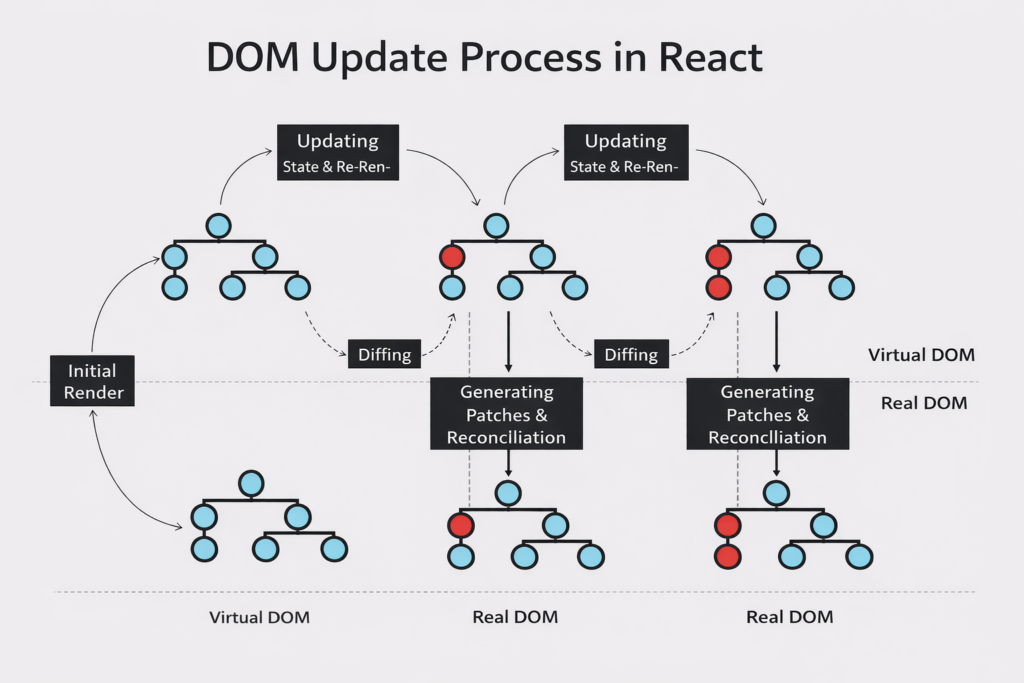
Step 1: Initial Render
- You define a React component using JSX, which describes the initial UI layout.
- On the first render, React converts this JSX into a Virtual DOM tree—a lightweight JavaScript representation of the UI.
Step 2: State or Props Change
- UI updates are usually triggered by changes in state or props.
- When
setStateis called or new props are received, React schedules a re-render.
Step 3: Re-rendering
- React re-renders the component and creates a new Virtual DOM tree that reflects the updated data.
Step 4: Diffing
- React compares the previous Virtual DOM with the new one.
- This comparison identifies the smallest set of changes required to update the Real DOM.
Step 5: Patch Creation
- Based on the diffing results, React generates virtual patches.
- These patches describe specific DOM operations, like:
- inserting elements
- deleting elements
- updating attributes or text
- inserting elements
- deleting elements
- updating attributes or text
Step 6: Reconciliation
- React applies these patches to the Real DOM.
- Various optimizations—such as batching updates and skipping unnecessary re-renders—help keep performance high.
- Once reconciliation finishes, the Real DOM matches the updated Virtual DOM.
- The user now sees the updated UI.
Step 7: Additional Updates
- If another state or prop change occurs, React repeats the process, starting from re-rendering.
Step 8: Final Sync
- React applies the latest patches from diffing to ensure the Real DOM accurately represents the most current state of the application.